Free PageSpeed check for Singapore online storesCheck your store now
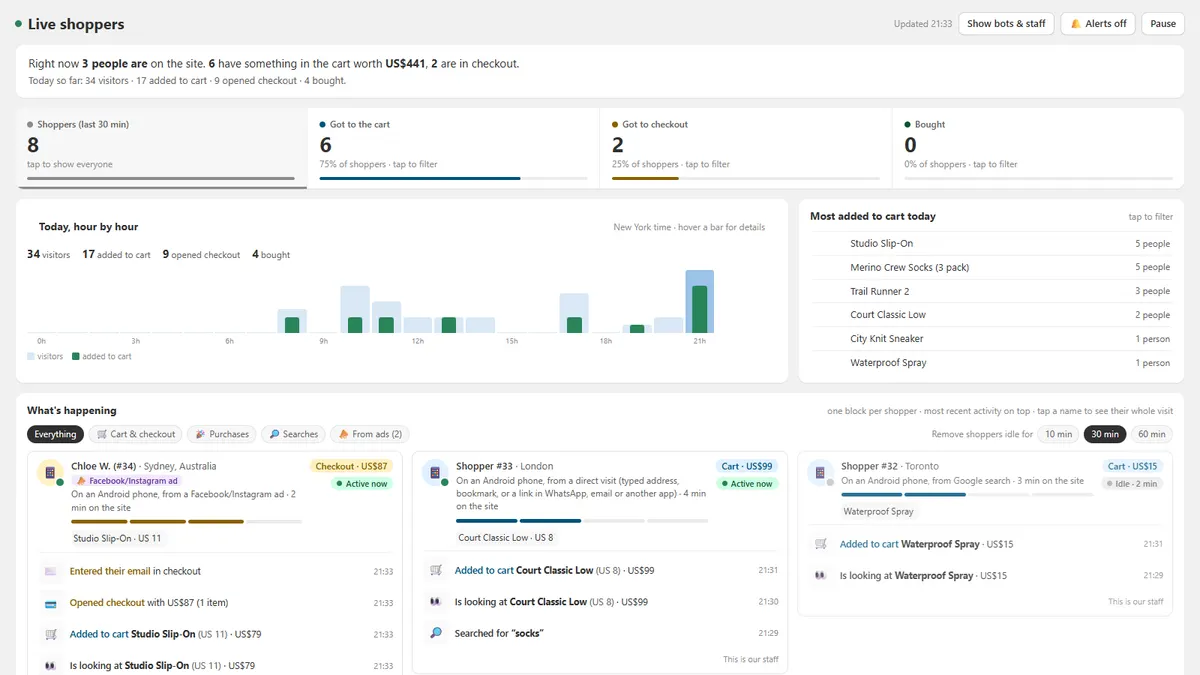
The Live Shoppers screen: how many people are on the store now, how many have a cart or are in checkout, today hour by hour, the most added products, and one block per shopper with what they did
The live view, with sample shoppers. Open the demo to click around.

One block per shopper. Everything they do, as it happens.

It lives in your Shopify admin, next to your orders. No dashboard to learn: each shopper reads like a short story.

  • Who is shopping, and from where

    Every visitor gets a number that stays, so Shopper #12 is still #12 when they come back next week. You see their phone or computer, their city, and whether they came from Google, an ad or Instagram.

  • Cart and checkout, step by step

    A four-step bar shows how far each shopper got: browsing, cart, checkout, paid. Turn on alerts and a soft ding tells you when someone adds to cart or pays.

  • Real names once you know them

    When a shopper logs in, types their email in checkout or buys, the number turns into their name, with their past orders. Tap the name to open their Shopify customer profile.

  • Bots and your own team, filtered out

    Crawlers and fake visitors are flagged and left out of the numbers. Mark your own phone or shop computer as staff once, and your visits stop counting.

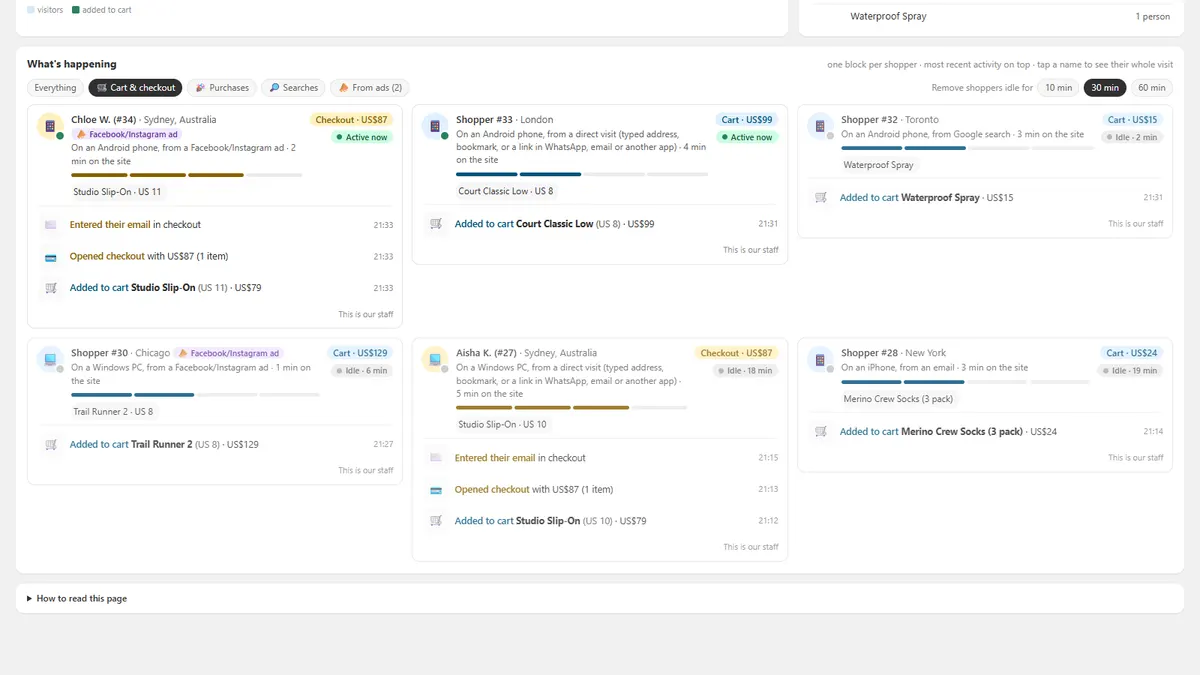
The Cart and checkout filter: only shoppers who added something, each with the steps they took, such as added to cart, opened checkout and entered their email
The Cart and checkout filter shows only shoppers who added something, with each step they took. Sample shoppers.

The Reports tab: what happened, not only who's here now.

Pick a period: today, yesterday, the last 7 or 30 days, or your own dates. Five reports, in plain English.

  1. Carts left behind. Shoppers you can follow up: they gave their name at checkout or were logged in, added to cart and didn't pay. You see who they are and what was in the cart. Anonymous carts are counted too.
  2. Where checkout loses people. Of the shoppers who opened checkout, how many reached each step, and where most of them stopped.
  3. Product interest. The most wanted products. The ones many people look at but few add to cart, which often points to the price, the photos, the sizes or delivery. And second thoughts: products added to cart, then removed again.
  4. What people search for. The words shoppers type into your store search, and the searches that went nowhere because nobody opened a product afterwards.
  5. Where buyers come from. Which sources, countries and devices bring visitors who add to cart and buy, not only visitors.

Every Monday: what to restock.

A short email with last week's most-added and most-viewed products, the exact sizes and colours people wanted, and what they searched for. Then a restock shortlist: products people wanted that are down to their last 3.

LIVE SHOPPERS · YOUR STORE

What shoppers wanted, 27 Oct to 2 Nov

1,284 shoppers · 96 added to cart · 41 checkouts · 23 bought

Restock shortlistAddedViewedStock
Trail Runner 2 · Black11642
Merino Crew Sock (3-pack)8311
Daypack 20L · Olive640Out

Up and running the same day.

No code and no theme changes. Live Shoppers runs inside Shopify's own pixel sandbox, separate from your theme.

  1. Enter your store and payYour store address and email below, then card payment through Stripe.
  2. Get your install linkWe set up your store's own private copy of the app and email you the link, usually the same day.
  3. Click InstallOpen the link in your Shopify admin and press Install. Shoppers appear with your next visitor.

Price and order form

Live Shoppers

S$299 once

Then S$10 a month. Cancel any time.

  • The live view in your Shopify admin, also on the Shopify phone app
  • The Reports tab: carts left behind, checkout steps, product interest, searches, where buyers come from
  • Real names and past orders for known customers
  • Bot and staff filtering
  • The Monday restock email
  • A year of history kept for the weekly numbers

Also coming to the Shopify App Store as FirstFrame Live Shoppers. It's been submitted for review.

Get it for your store

Find it in Shopify admin › Settings › Domains. It ends in .myshopify.com.

Secure card payment by Stripe. The first payment is the S$299 setup plus your first month, then S$10 a month.

Questions

Will it slow my store down?

No. It uses Shopify's web pixel system, which runs in a sandbox separate from your theme and sends a tiny message per action. Nothing is added to your theme code.

Which Shopify plan do I need?

Any plan with an online store. Checkout steps show on every plan, and the live view works the same on Basic and on Plus.

Where do I see it?

In your Shopify admin, under Apps › Live Shoppers. It works in the Shopify phone app too.

What about customer privacy?

Shoppers are anonymous numbers until they identify themselves to your store. We never store IP addresses or checkout emails, and the pixel follows your store's cookie consent settings. The privacy policy has the details.

How do I cancel?

Tap Manage billing at the bottom of the app, or uninstall it. The monthly charge stops at the end of the paid month.

Is it on the Shopify App Store?

Not yet. It has been submitted for review as FirstFrame Live Shoppers. Until it's approved, you buy it here and we email you a private install link for your store.

Who makes it?

FirstFrame, the team behind Inlinex, an online skate shop in Singapore. We built it for our own store first and use it every day.