Free
US$0
- 50 images resized, in total
- All canvas sizes and fill control
 A Shopify app by FirstFrame Coming soon to the Shopify App Store
PixelPrep puts each product photo on one canvas size you choose, such as 1200 × 1200. The product is scaled up or down to fill it, centred, and never stretched or squashed. Photos also come out smaller, so pages load faster.
Free for your first 50 images. Standard US$4.99, Pro US$9.99 a month, billed by Shopify.
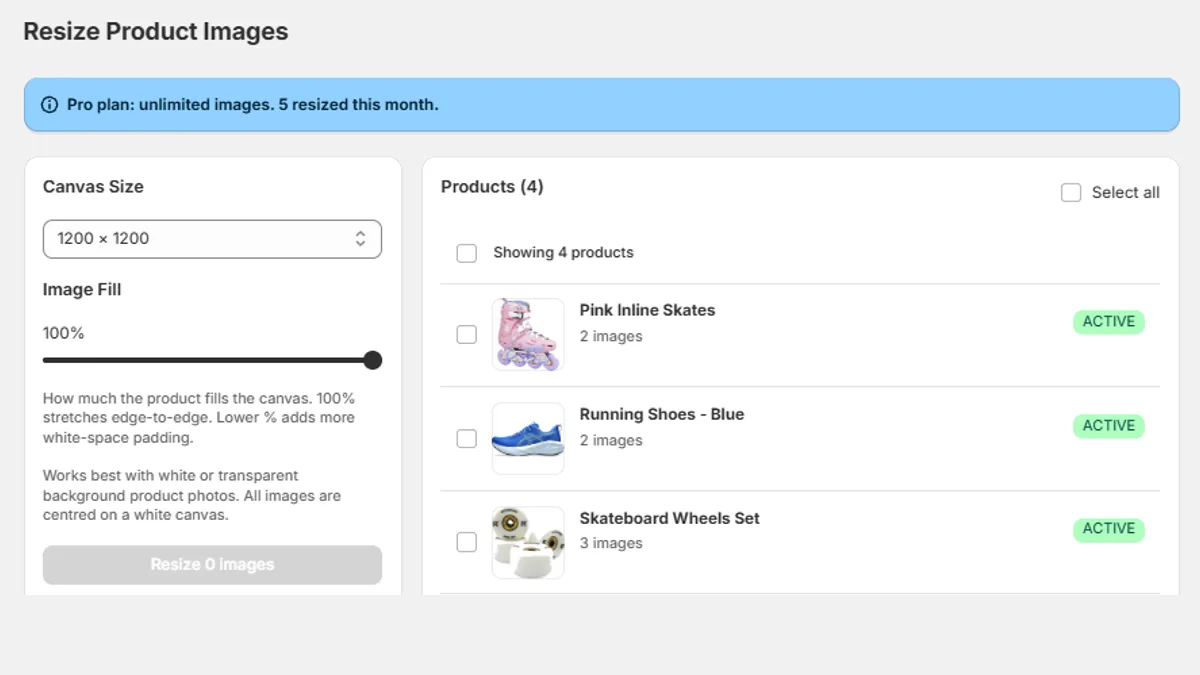
The same steps Inlinex uses for its own catalogue, done for you on every selected product.
Pick a size from 800 × 800 to 2048 × 2048, or your own. Every photo of the selected products comes out exactly that size, so your product grid lines up.
Empty white space around the product is trimmed, then the product is scaled to fill the canvas. Its shape is kept exactly: a tall boot stays tall, a wide board stays wide.
The fill slider sets how much of the canvas the product covers, from 50% to 100%, so every product sits with the same margin.
PixelPrep is made for product photos on a white or transparent background: near-white becomes pure white, and transparent PNGs are placed on white. Photos with a coloured or busy background are resized whole instead: fitted inside the canvas as they are, not trimmed or filled, and the app shows you which ones.
Each photo is saved at the lowest quality that still looks identical to the full-quality version, worked out photo by photo, with camera data removed. That is about 30% smaller than a standard high-quality save.
The new photo is added before the old one is removed, and it keeps the old photo's description (alt text), so a failed upload never leaves a product without its photo.
Billed by Shopify on your normal Shopify bill. Try it free on your first 50 images, then choose a plan; change or cancel any time from the app.
US$0
US$4.99 a month
US$9.99 a month
PixelPrep has been submitted to the Shopify App Store and is waiting for Shopify's review. Once it's approved, the install button will be on this page.
No. It only trims the empty white border, then scales the product evenly in both directions until it fills the canvas you chose. Nothing of the product is cut off, and its proportions never change.
Product photos on a white or transparent background, in JPEG, PNG or WebP. Trimming and filling the canvas work on those. Photos on a coloured backdrop and lifestyle shots are still resized to your canvas size, but whole: nothing is trimmed or cut off, and there may be white space where the shapes differ. The app's 'Won't fill the canvas' tab lists them.
Yes: the resized photo replaces the original on the product. Try it on one product first. If you want to keep the originals, download them from Shopify before you resize.
On the Pro plan, new products and newly added photos are resized to your default settings automatically. Photos that are already the right size are skipped. It's off until you switch it on in Settings.
No. PixelPrep adds nothing to your theme or your pages. It works in your Shopify admin, and the smaller photos it saves usually make pages load faster.